Table of Contents
- 1. What LinkedIn announced
- 2. The card is the 2018 QR code, grown up
- 3. Your headline is the card now
- 4. The Network feed makes in-person connections worth more
- 5. Profile notes: a lightweight CRM, if you pay
- 6. What to do now
- 7. Frequently asked questions
- 7.1. What is the LinkedIn digital business card?
- 7.2. When will I get it?
- 7.3. Is it different from the old LinkedIn QR code?
Short on time? LinkedIn announced digital business cards on 15 October 2026: a scannable card built from your profile photo and headline that sits in your phone's wallet, rolling out globally over the coming months. On its own it is a prettier version of the profile QR code LinkedIn shipped in 2018. The reason to care is what it ships with: a connections-only Network feed, private notes on profiles, and pinned comments. Together they make meeting someone in person worth more on LinkedIn than it has been in years. The first move is unglamorous: rewrite your headline, because the card prints it.
What LinkedIn announced
On 15 October 2026, LinkedIn announced a bundle of connection and creator features. Four of them change how connecting works:
- Digital business cards. In LinkedIn's words: "You can now design and personalize your LinkedIn business card to express who you are professionally, add it to your digital wallet, and easily stay connected with people you meet in person." Rolling out globally over the coming months.
- A Network feed test. A dedicated feed with only posts from your connections and the people you follow, tested first in the US, India, the UK and Australia.
- Private profile notes. Premium subscribers can attach a private note to any profile: how you met, what you discussed, when to reconnect. Available globally.
- Pinned comments. Post authors can now pin the comments they find most useful to the top of the thread.
The same announcement carried the earning half: a creator dashboard, pre-roll ad revenue and paid Advice Sessions, which Engadget covered on 15 October and we wrote up in LinkedIn will now pay creators. This post is about the connection half, because that is the part that changes day-to-day behaviour for anyone building an audience.
On the card itself, Social Media Today reported on 18 October 2026 that it displays your headshot and role line pulled from your profile, plus a QR code, with a set of design and colour options shown off at LinkedIn's "Connection by Design" event.
The card is the 2018 QR code, grown up
LinkedIn has tried this before. It added profile QR codes for offline networking back in 2018, and as Social Media Today put it, that version "never appeared to catch on as a significant connection tool." If you never noticed the QR code existed, that is the point.
Two things are genuinely different this time. The card lives in your phone's wallet next to boarding passes, so it is two taps away instead of buried in the app's search bar menu. And it is designed to be looked at: your photo, your role line, your choice of colours. The 2018 code was a utility. This one is meant to be handed over.
My bet is the wallet placement is what makes it stick. The 2018 version failed on friction, not on the idea. A founder in a Reddit thread about digital cards last week put the underlying truth plainly: "Almost every time I have put in an application for funding and in many small grants, they ask for LinkedIn. I think it has become in many ways a business card." LinkedIn is now just being literal about it.
Your headline is the card now
The card is generated from your profile, so whatever your headline says today is what you will be handing strangers at events for the next year.
That changes the test a headline has to pass. A headline written for the feed ("I turn chaos into pipeline 🚀") or stuffed with seven pipe-separated keywords reads very differently as a business card held by someone you met ninety seconds ago. On a card, the line has one job: say what you do and for whom, in words the other person can repeat to a colleague.
This was always good advice. The card makes it enforceable, because now the headline gets read in a context where vagueness is embarrassing. If yours fails the card test, fix it before the rollout reaches your account. Our guide to networking on LinkedIn covers what to do after the connection lands.
The Network feed makes in-person connections worth more
For years, connecting with someone has not meant they see your posts. The default feed ranks algorithmically, so a new connection's content competes with everything LinkedIn predicts you will engage with, and mostly loses. That gap is why conference connections went quiet: you met, you connected, and neither of you ever surfaced in the other's feed again.
The Network feed test narrows that gap. A tab with only connections and followed accounts means the person who scanned your card actually encounters your next post, provided they open that tab. We walked through the mechanics when LinkedIn first split the feed into Network and For You tabs; this announcement moves the test to the US, India, the UK and Australia.
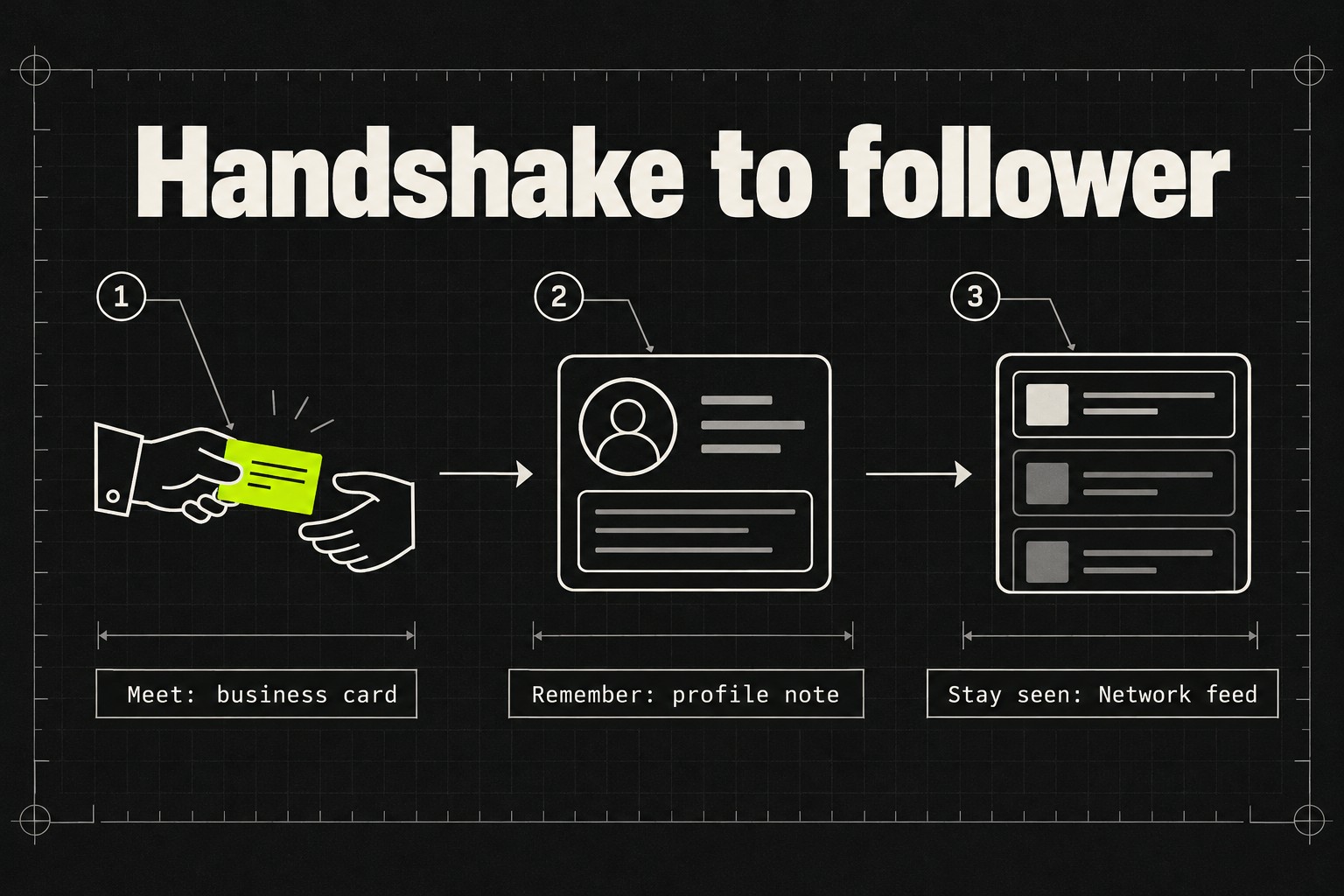
Put the pieces together and there is a loop that did not exist before: the card converts a handshake into a connection, the note keeps the context, and the Network feed keeps your posts in front of that person. The loop is the news here. No single feature in the bundle is remarkable on its own.
Profile notes: a lightweight CRM, if you pay
The notes feature answers a real problem. LinkedIn's own research, quoted in the announcement, says more than half of Gen Z are unsure what to do after connecting with someone. Consultants and salespeople have solved this with spreadsheets or a CRM; now the "met at SaaStr, asked about pricing, ping in March" note can live on the profile itself, visible only to you.
The catch is that notes are Premium-only. That is a deliberate choice: LinkedIn is packaging follow-up discipline as a paid feature. If you already pay for Premium, start using notes the day you get them. If you do not, a text file with names and dates does the same job for free, just without the convenience of the note appearing when you land on the profile.
What to do now
Five moves, in order of urgency as of October 2026:
- Rewrite your headline as a card line this week. One sentence, what you do and for whom. The feed rewards cleverness; a card rewards clarity.
- Check your profile photo at small sizes. It is the other thing the card prints. A photo that works as a feed avatar can fail as the face on a card.
- Add the card to your wallet when the rollout reaches you. It is global but staged over the coming months, so the option may not appear immediately.
- Write the note the same day you connect. Premium subscribers get this built in; everyone else should keep the habit externally. You will not remember the details next week.
- Write comments an author would pin. Pinned comments give a useful reply permanent top placement on a post, which is the cheapest visibility LinkedIn has handed commenters in a while. Our commenting guide covers what makes a comment worth pinning: add a fact, an example or a counterpoint, not applause.
One thing not to do: do not treat the card as the outcome. A scan is not a relationship. The scan starts the loop; the note and your next three posts are what finish it.
Frequently asked questions
What is the LinkedIn digital business card?
A scannable, customisable card generated from your LinkedIn profile photo and headline. You design it in the app, add it to your phone's digital wallet, and people you meet scan it to connect with you on LinkedIn. It was announced on 15 October 2026.
When will I get it?
LinkedIn says the card is "rolling out globally over the coming months," with no fixed date per market as of October 2026. If you do not see it yet, that is the staged rollout rather than an eligibility rule.
Is it different from the old LinkedIn QR code?
Same idea, better execution. The 2018 QR code lived inside the app's search bar and offered no customisation. The card adds wallet storage, your photo and headline on the card face, and design options. Social Media Today notes the 2018 version never caught on.
The bottom line: the card is a small feature with a useful side effect. It drags your headline out of the feed and into the real world, and together with profile notes and the Network feed it gives in-person networking a payoff on LinkedIn again. Fix the headline first. Everything else in the loop depends on what that one line says.