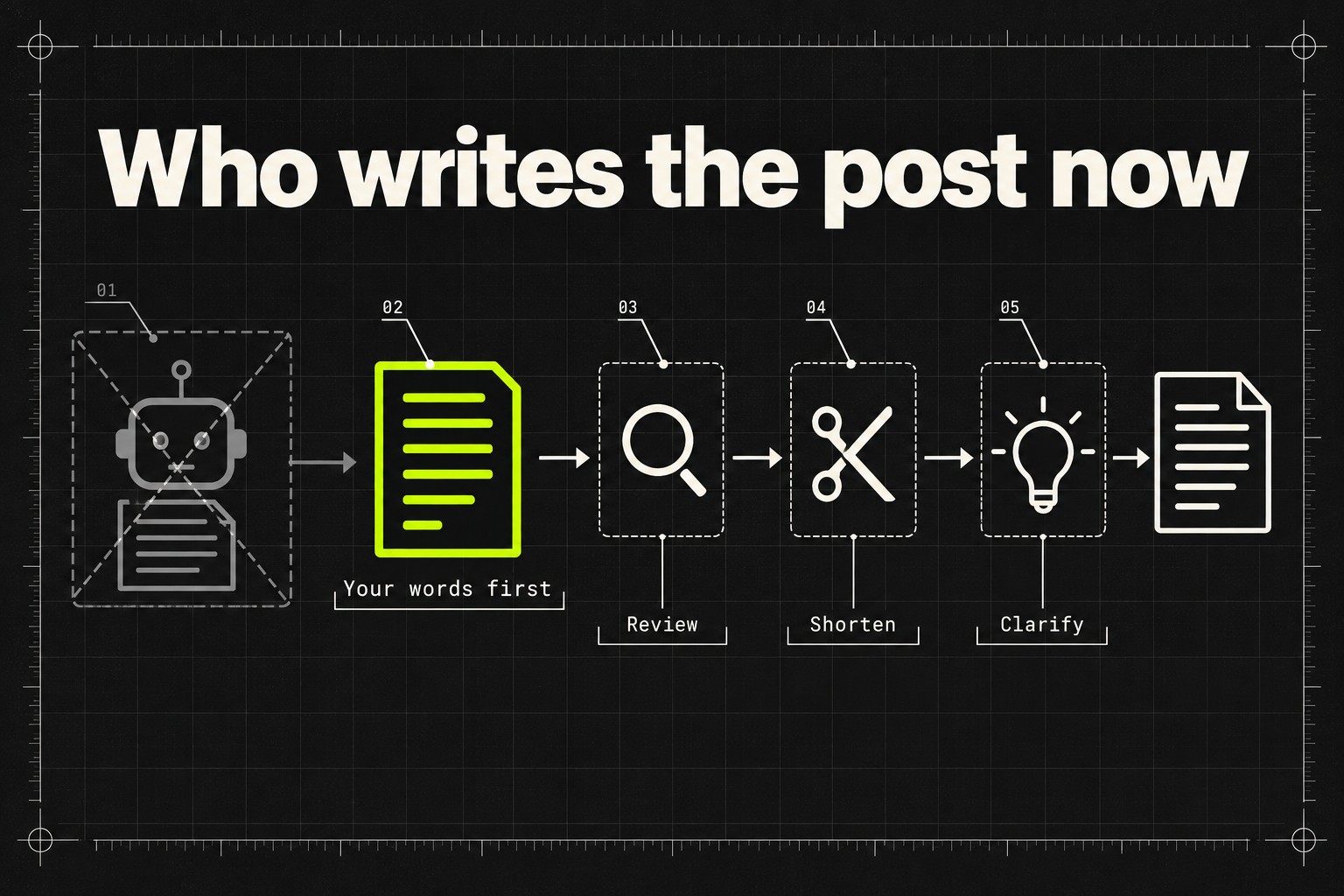
Short on time? LinkedIn has replaced its AI post writer with Post Proofreader, a Premium tool that only edits text you wrote yourself. It will review, shorten or clarify a draft, and nothing more. The swap says plainly where LinkedIn now draws the line: AI that polishes your words is a feature it sells, AI that produces your words is slop its classifiers bury. LinkedIn says views of content classified as AI slop are already down about 40%. If you grow on LinkedIn by posting and commenting, the safe workflow as of October 2026 is simple: you write, AI edits.
The feature itself is small. What it replaces, and why, is the actual news.
What LinkedIn shipped, and what it removed
Post Proofreader rolled out to Premium subscribers in late September 2026. It takes a draft you have already written and offers edits in one of three modes: Review fixes spelling, grammar and punctuation, Shorten trims the post while keeping your meaning, and Clarify makes it easier to read. Suggestions appear inline with change tracking, the way a word processor shows them, and nothing is applied until you accept it. LinkedIn's own description is blunt about who stays in charge: "Suggestions appear with inline change tracking, so you can review what changed and stay in control of your content" (Social Media Today, 20 September 2026).
It replaces "enhance your post", the feature that could rewrite an update or generate one from a vague prompt. LinkedIn removed that tool quietly in August, the same month it launched a button for reporting AI slop. The old feature wrote for you. The new one refuses to.
The rollout is narrow for now. Metricool's walkthrough (3 October 2026) notes it covers Premium Career and Premium Business subscribers and reads English drafts only. It also has rough edges: manual editing pauses while a suggestion is open, there is no version history or undo, and unresolved suggestions disappear when you close the tool. Nobody needs to rush to use it. The point is what it signals.
Why LinkedIn killed its own AI writer
Because its users told it to, a million times. LinkedIn added a "seems like AI slop" report option in August 2026, and in its September newsroom update said more than one million members used it within the first two weeks. The same update reports that views of content its classifiers mark as AI slop have fallen by 40%, that the report option now covers comments as well as posts, and that LinkedIn is catching hundreds of thousands of automated comment attempts every day.
Hold two of those facts side by side. In August, LinkedIn was running a button for reporting AI-written posts while selling a feature that wrote posts with AI. That position could not last. Removing the writer and keeping only a proofreader resolves it: the words have to be yours, the cleanup can be machine.
Users have felt the enforcement side more than the feature side. Threads like "Massive drop in post reach since LinkedIn introduced the AI Slop button" have been appearing on r/linkedin since late September. Those are individual reports, not platform data, but they point the same direction LinkedIn itself describes: slop classification now costs distribution.
Review, shorten, clarify: the sanctioned list
The most useful way to read Post Proofreader is as a published rubric. LinkedIn's newsroom post spells it out: the company is "replacing 'enhance your post' feature with tools that proofread and improve clarity without changing a member's voice, reinforcing the distinction between AI assistance and AI slop." Three operations made the cut: fix errors, cut length, improve readability. Everything the old tool did beyond that, inventing the angle, generating the paragraphs, restyling your text into generic LinkedIn voice, is exactly the material the classifiers are being trained to demote.
LinkedIn ads specialist AJ Wilcox, interviewed on Social Media Examiner's podcast (2 October 2026), adds a detail worth knowing. He believes the slop reports are currently training LinkedIn's detection models rather than directly punishing flagged posts. The penalty, in his reading, arrives later and automatically, once the classifiers have absorbed a few million human judgements about what slop looks like. There is already a private consequence too: LinkedIn now tells authors in post analytics when their audience has flagged a post as seeming AI-generated.
If Wilcox is right, the timing matters. A post that reads as generated is not only at risk from today's classifiers but from next quarter's, trained on this quarter's reports. The tells that get content flagged have not changed much, and we walked through them in our guide to avoiding AI content pitfalls on LinkedIn: the uniform cadence, the em dashes, the inspirational closer that could sit under anyone's name.
Comments are explicitly in scope
If commenting is your growth channel, this update is aimed at you more than at posters. The slop report option extends to comments, and automated commenting is where LinkedIn says enforcement is heaviest: hundreds of thousands of blocked attempts per day, by its own count. Wilcox adds an observation from the feed side: AI comments that read generic collect almost no likes or replies, so natural engagement sinks them even before any classifier gets involved.
None of this makes commenting a worse channel. The same Social Media Examiner piece notes that time spent in comments is up 18% year over year and that commenters can now see impression counts on their comments, which turns commenting into a measurable strategy rather than a hopeful one. What changed is the floor. "Great post" and its AI-written equivalents are dead weight now, reportable and ignorable at the same time. A comment has to respond to what the post actually says, in a voice that sounds like one specific person. That has been the standard worth holding since long before the crackdown; our commenting guide is built around it, and it is the bar we build Commentify against: comments that come from the specific post, not from a template.
What to do now
Four moves, in order of urgency.
- Move AI to the edges of your writing this week. Brainstorm with it, draft in your own words, then let it edit. Wilcox calls this the sandwich: AI on the outside, your expertise in the middle. It also happens to match exactly what LinkedIn's own product now permits.
- Audit anything that comments for you. If a tool posts comments a stranger could have written without reading the post, stop it before the classifiers do. Generic output is now the single most reported, most blocked activity on the platform.
- Check your post analytics. The slop-perception signal is private, so you may already have flagged posts and not know it. If it appears, change the writing process, not just the topic.
- Do not buy Premium for the proofreader. It is English-only, has no undo, and a free grammar checker does the same job. Its value is as a signal of where the line sits, not as a tool.
One thing not to do: overcorrect into leaving typos as proof of humanity. Wilcox cautions that AI can fake typos as easily as it fakes polish. Readers flag emptiness, not neatness. A post with a real observation in it survives being well edited.
The bottom line
Platforms rarely tell you what their ranking systems want. This time LinkedIn did, in the shape of a product: review, shorten, clarify, and nothing that replaces your voice. The 40% figure shows the penalty side is already live, and the million slop reports show your audience is doing the detecting. How the feed weighs all this is covered in our breakdown of the LinkedIn engagement algorithm, but the short version stands on its own: write it yourself, let the machine tidy it, and put the effort saved into saying something only you could say.