
Table of Contents
- 1. Start with the job, not the tool list
- 2. How a tool runs matters more than its feature list
- 3. The 2026 shortlist, with current prices
- 3.1. Outreach sequencers
- 3.2. Engagement and commenting
- 4. What counts as safe volume in 2026
- 5. Key features worth evaluating
- 6. How to stay authentic while automating
- 7. Conclusion: match the tool to the job
There is no single best LinkedIn automation tool in 2026, because "LinkedIn automation" is really three different jobs: sending connection requests and message sequences, engaging with other people's posts, and keeping your own activity visible without living in the feed. The tools that win each job barely overlap. As of November 2026, cloud sequencers like Expandi ($99 a month) and Dripify (from $59 a month) lead outreach, desktop tools like Linked Helper (from $15 a month) are the safety-first pick, and comment-focused tools like Commentify cover engagement. This guide sorts the market by job, by how each tool runs, and by what it actually costs right now.
If you landed here looking for a straight outreach roundup, we keep deeper, per-tool breakdowns in our guides to LinkedIn automation tools for lead generation and LinkedIn DM automation tools. This page is the umbrella: it explains how to choose.
Start with the job, not the tool list
Most "best tool" lists compare twenty products on the same grid, which hides the fact that they aren't competing with each other. A sequencer that sends 25 connection requests a day and a tool that comments on posts in your niche touch completely different parts of LinkedIn. Decide which job you're hiring for first:
- Outreach: connection requests, follow-up messages, InMail. This is where Expandi, Dripify, Waalaxy, Dux-Soup and HeyReach live.
- Engagement: showing up in conversations through comments and reactions so people see you before you ever message them. This is Commentify's niche.
- Presence: thought leadership and consistent posting, which automation can support but shouldn't fully write for you.
Plenty of people need two of these. Almost nobody needs one tool to do all three, and the tools that claim to usually do each job worse than a specialist.
How a tool runs matters more than its feature list
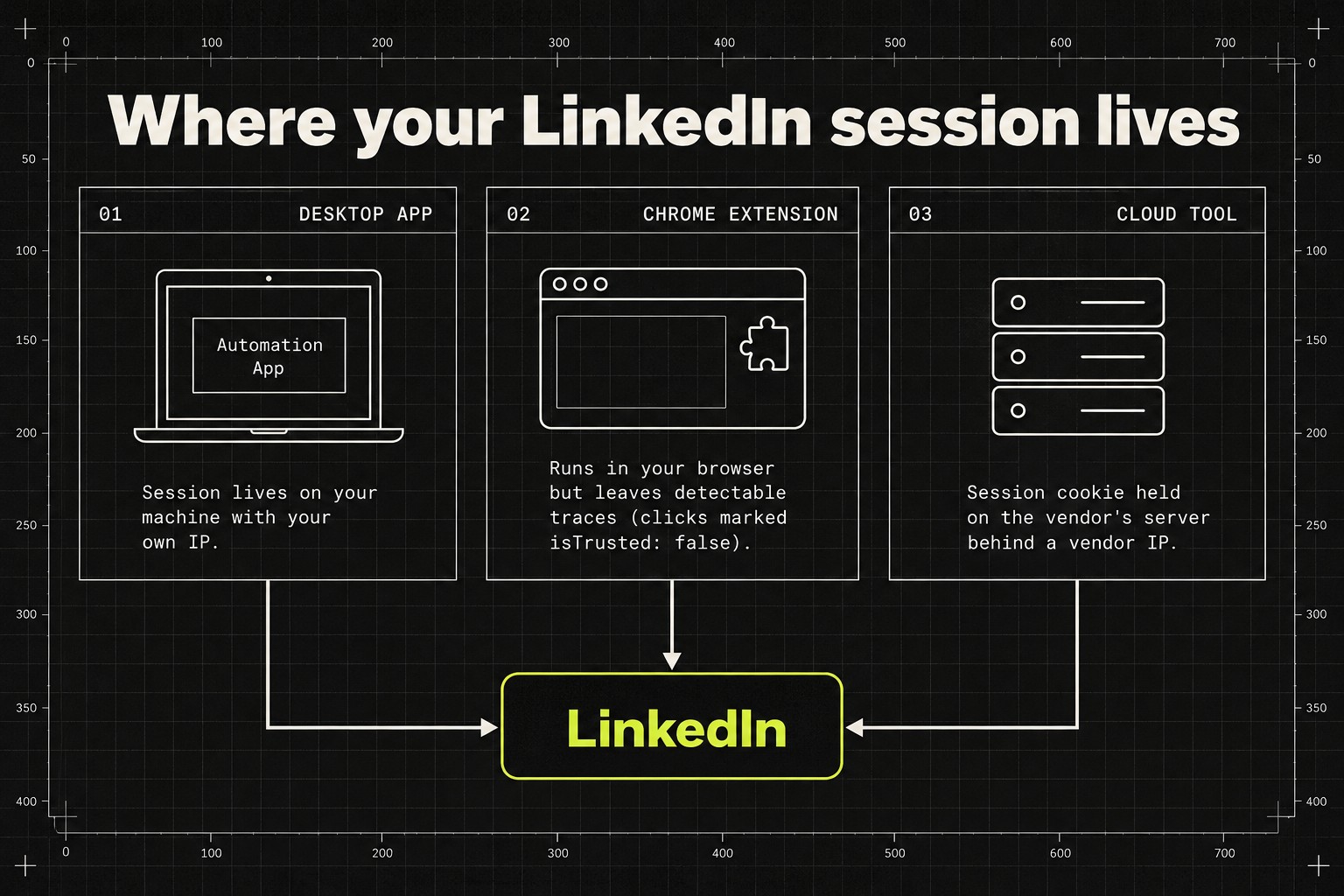
The biggest practical difference between tools in 2026 isn't features. It's architecture: where your LinkedIn session actually lives while the tool works.
Linked Helper's safety guide, updated 13 November 2026, breaks the market into three camps. Desktop apps keep your session on your own machine with your own IP and fingerprint. Chrome extensions also run locally, but they leave traces LinkedIn can detect; clicks generated by an extension carry an isTrusted: false attribute that distinguishes them from human clicks. Cloud tools move the whole session to the vendor's servers, which means handing over your session cookie, effectively a login credential, to a third party. The same guide ran fraud-risk checks on cloud vendors' IP addresses and found several scoring 94 to 100 out of 100 on IPQualityScore.
Worth saying plainly: that study was published by a desktop-tool vendor, so it argues for its own category. But the architecture distinction itself is real, and cloud vendors advertise their answer to it, dedicated IPs and built-in activity caps, precisely because the risk exists. If your account pays your bills, know which trade-off you're making before you pick a tool.
The 2026 shortlist, with current prices
Prices below come from lemlist's August 2026 comparison and Linked Helper's November 2026 guide, both checked this month. Annual billing is meaningfully cheaper on almost all of them.
Outreach sequencers
- Expandi: $99 a month per seat. Cloud-based, if/else conditional sequences, dedicated IPs. The default pick for LinkedIn-first outbound teams.
- Dripify: Basic $59, Pro $79, Advanced $99 monthly; annual billing drops Basic to $39 and Pro to $59. The cheapest credible cloud sequencer, though Basic caps you at one campaign.
- Waalaxy: freemium, with paid plans from €56 a month. The gentlest on-ramp if you've never run a campaign.
- Dux-Soup: Pro from $14.99 a month ($11.25 billed annually). Runs as a Chrome extension, so Chrome has to stay open, and CRM sync and advanced workflows need a higher tier than Pro.
- HeyReach: $79 a month per sender, built for agencies rotating outreach across many client accounts. See our agency tools guide for that use case.
- Linked Helper: Standard $15, Pro $45 a month. A desktop app rather than a cloud service, which is exactly why the safety-conscious pick it despite the steeper setup.
Engagement and commenting
Sequencers don't touch this side of LinkedIn at all. Comment-first tools work on the opposite theory: instead of interrupting strangers in their inbox, you become visible in the conversations they're already having. Commentify specializes in automated commenting on relevant posts to build visibility and credibility over time. If you're weighing comment-first tools against classic outreach, our comparison of tools people switch to from Dripify covers that decision in detail.
What counts as safe volume in 2026
LinkedIn says directly that unauthorized automation can lead to account restrictions, so every number here is about lowering risk, not removing it.
Based on its 2026 testing, Linked Helper recommends keeping aged accounts around 20 to 25 connection requests a day, with roughly 100 a week as a soft ceiling, and starting new accounts at 5 to 10 a day, ramping up over at least four weeks. lemlist's guide puts the weekly cap at roughly 100 requests for most accounts, 50 to 80 for new accounts, and 150 to 250 only for mature Sales Navigator accounts. Treat those as ceilings, not quotas: your acceptance rate matters more than your volume, and if it drops, slow down. Commenting has its own pacing math, which we cover in our guide to how many LinkedIn comments a day is safe.
Key features worth evaluating
Once you know the job and the architecture, the feature comparison gets short. Look for personalization that goes beyond a first-name merge field, built-in throttling with daily caps you can lower, scheduling that matches when your audience is online, and analytics that report response rates and connection acceptance rates rather than vanity activity counts. If you run a CRM, two-way sync saves real time; if you don't, skip paying for it.
How to stay authentic while automating
Automation should amplify your presence, not dilute it. Keep templates flexible enough that your tone survives them. Don't automate high-stakes conversations; the moment a real prospect replies, a human should take over. And review what your tools send or publish regularly, because drift is gradual and nobody notices their own account sounding robotic until someone tells them.
Conclusion: match the tool to the job
If your aim is lead generation and outreach at scale, Expandi and Dripify are the strongest cloud options in 2026, and Linked Helper is the pick when account safety outranks convenience. If your focus is building trust and visibility through thoughtful engagement, Commentify fills a niche the sequencers don't touch: smart, automated commenting that keeps you present in high-value conversations without sounding robotic.
Ready to turn your LinkedIn activity into meaningful engagement without spending hours every day? Commentify helps you comment consistently and naturally, so you can grow your presence with less effort.